Frequently Asked Questions
Everything you need to know about MixTube
What is MixTube?
MixTube turns any YouTube playlist into a DJ-style mix with smooth crossfades between videos. It analyzes each track's BPM (tempo) and musical key, then sorts them for harmonically compatible transitions. Perfect for house parties, cafes, venues, or just vibing at home—no DJ skills required.
What is BPM?
BPM stands for Beats Per Minute—it measures how fast a song is. A slow ballad might be 60-80 BPM, while energetic dance music is typically 120-140 BPM. Techno and drum & bass can go up to 150-180 BPM.
What is the Camelot Wheel and harmonic mixing?
Harmonic mixing is the art of blending songs that are in musically compatible keys. Just like chords in a song sound good together, tracks in related keys create smooth, pleasing transitions when mixed.
The Camelot Wheel is a color-coded system that makes harmonic mixing easy. Each musical key is assigned a code like 8A or 11B:
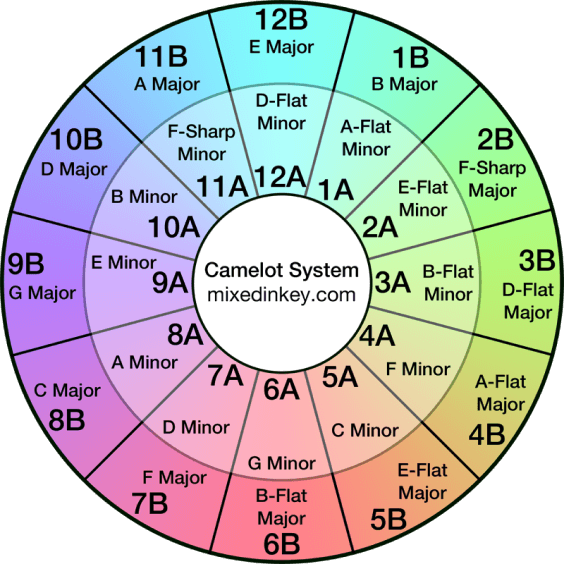
How to read Camelot codes:
- The number (1-12) represents the key's position on the wheel
- The letter A = minor keys (darker, moodier sound)
- The letter B = major keys (brighter, happier sound)
• Same code (8A → 8A): Perfect match
• Adjacent numbers (8A → 7A or 9A): Smooth energy shift
• Same number, different letter (8A → 8B): Relative major/minor—dramatic but musical
For example, if you see 8B in MixTube, that's the key of C Major. It mixes well with 7B (F Major), 9B (G Major), and 8A (A minor).
What do the key codes like "8A" or "11B" mean?
These are Camelot notation codes. Here's what some common ones translate to:
MixTube automatically detects these keys and sorts your playlist so adjacent tracks are harmonically compatible.
How to make a MixTube Mix?
There are two easy ways to create a MixTube mix:
Method 1: Paste the URL
Copy and paste a Public or Unlisted YouTube playlist URL into the input field on our homepage and click "Mix Playlist".
Method 2: URL Shortcut (fastest!)
While viewing any YouTube playlist, simply replace youtube.com with mixtube.ai in your browser's address bar and hit Enter.
https://www.youtube.com/playlist?list=PLxyz...becomes
https://mixtube.ai/playlist?list=PLxyz...Also works with video URLs containing a playlist:
https://www.youtube.com/watch?v=abc&list=PLxyz...becomes
https://mixtube.ai/watch?v=abc&list=PLxyz...
MixTube will analyze your tracks and create a harmonically mixed DJ set automatically.
Who is behind this?
Made by SYCHEDELIX from Dejay AI—a DJ AI assistant.
How does "Feeling Lucky" work?
Feeling Lucky randomly picks a playlist from community-published MixTube playlists. Hit it when you want to discover something new!
Can I edit my published playlist?
You can edit your playlist for a while on the same browser after creating it. Once published to the community, it becomes permanent. You can always create a new MixTube playlist or edit the original YouTube playlist directly on YouTube.
Can someone else edit my playlist?
No one can modify your MixTube playlist. However, if you share the link or publish it, others can use your YouTube playlist as a starting point to create their own MixTube version with different settings.
How many MixTube playlists can I make from one YouTube playlist?
Unlimited! You can create multiple MixTube playlists from the same YouTube playlist, each with different names, crossfade settings, and track orders.
How do I save a playlist to favorites?
Use your browser's bookmark feature to save any MixTube playlist URL. The playlist will be there whenever you return.
How do I exit fullscreen mode?
Press ESC or F to exit fullscreen.
What are the keyboard shortcuts?
Space Play/Pause · ← → Previous/Next track · F Toggle fullscreen · M Mute
Why did you make this?
To make it easy to create DJ-style mixes with smooth crossfades for house parties, cafes, and venues—without needing pre-recorded DJ sets or complicated software.
Is MixTube free?
Yes, MixTube is completely free to use.
How can I improve playback quality?
For the best experience, we recommend being signed in to YouTube in your browser. This helps with smoother playback and better audio analysis. If you have YouTube Premium, you'll also avoid ads during your mix, making for seamless transitions.
Why does playback stop on my phone when I lock it or switch apps?
Due to YouTube's restrictions, video playback often pauses when the app loses focus on mobile devices. This is a limitation of the YouTube player embedded in web browsers, not MixTube.
When you return to MixTube, it automatically detects if playback stopped unexpectedly and attempts to resume from where you left off. If auto-recovery fails, you'll see a "Resume" button.
Tips for better mobile playback:
• Keep the MixTube browser tab active and screen on
• Enable "Stay Awake" mode in your phone's developer options if available
• Tap the screen when you notice silence—MixTube will try to recover
• YouTube Premium subscribers may have better background audio support
• For parties, consider using a laptop or keeping your phone plugged in with screen on
The video is playing but there's no sound—what do I do?
This can happen on mobile when the audio stream disconnects but the video continues. MixTube monitors for this and will attempt to auto-recover by reloading the track.
• Tap play/pause twice (pause then play) to force audio reconnection
• Press the "Next" button to skip to the next track
• If MixTube shows a "Resume" prompt, tap it to restart playback
• Refresh the page as a last resort (your playlist position will be saved in the URL)
Do I need to create an account?
No account needed. Just paste a YouTube playlist URL and start mixing.
Still have questions?
Reach out to us at hey@mixtube.ai